iOS/iPad Notification Behaviors
iOS Notification behaviors let you control how different types of notifications behave in your app. Behaviors control sound, notification ,priority, bypass Do Not Disturb (Focus Mode) importance and other notification behaviors.
Notification behaviors are immutable after creation. To change their settings, you need to delete the existing channel and create a new one.
Info
Sending notifications to apple devices is not possible without any notification behavior
Learn more about iOS notification behavior in the official documentation
iOS Documentation: UNNotificationInterruptionLevel
To follow the instructions below, sign in to your Push0 account and navigate to the dashboard.
1. Creating Notification Channel
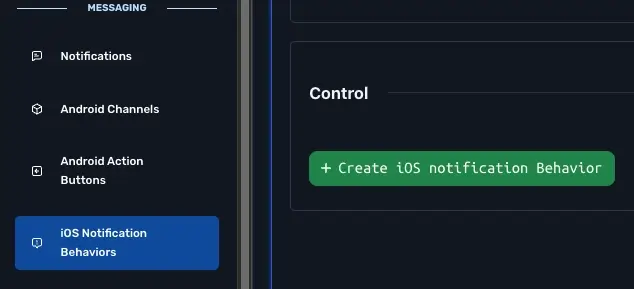
- In Navigation Messaging section pick iOS Notification Behaviors
- Click Create iOS notification behavior
- Enter all iOS notification behavior information
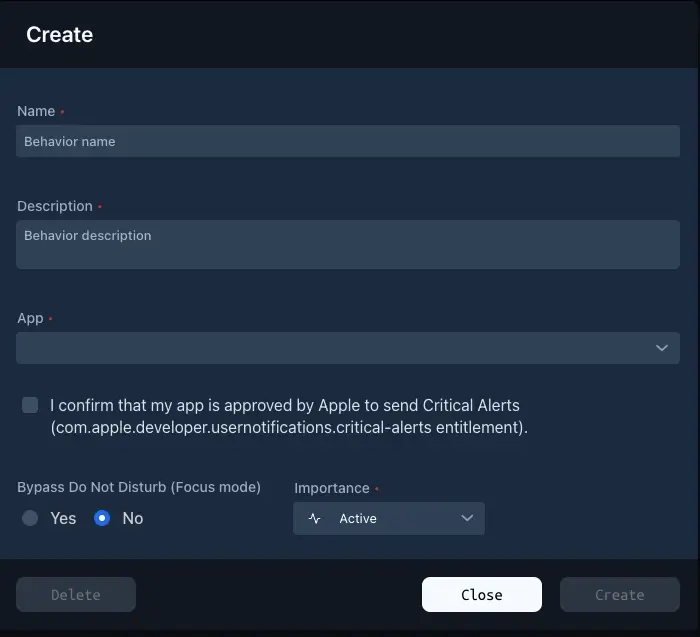
1 - Name (required)
Name of the behavior
2 - Description (required)
Description of the behavior.
3 - Application (required)
Pick which app can use this notification behavior.
4 - Bypass Do Not Disturb (Focus Mode) (optional)
Allows notifications from this channel to alert even when Do Not Disturb is enabled.
5 - Importance (required)
The Interruption Level controls how your push notification is presented to the user on iOS. It determines when and how the message is delivered, whether it can bypass Focus/DND (Do Not Disturb), and how much attention it demands.
Options:
- CRITICAL - Highest priority. Always breaks through Focus and DND. Plays a sound even in silent mode. Requires Apple approval and special entitlement (com.apple.developer.usernotifications.critical-alerts). Use Case: Health alerts, alarms, security warnings.
- TIME SENSITIVE - High-priority. Can break through Focus and DND if user has allowed it. Delivered immediately with sound and screen wake-up. Use Case: Calendar alerts, reminders, order delivery updates.
- ACTIVE - Standard priority. Notification makes a sound and appears on screen. Default behavior for regular notifications. Use Case: Chat messages, reminders, typical app updates.
- PASSIVE - Low-priority notification. Does not light up the screen or make sound. Delivered quietly to the Notification Center. Use Case: Promotions, recommendations, or FYI-type messages.
- NONE - No interruption. Used for silent pushes. No alert, sound, or badge is shown. Use Case: Background data sync, content updates, or invisible tracking. Does not display a notification
6 - Create
Done