iOS/iPad Notification Categories (optional)
Warning
Developer involvement will be required
Categories define sets of action buttons for notifications in your app. Each notification can use one category, and iOS will automatically show the matching user actions.
Warning
Categories are created and configured in the app by your developer. The backend only sends the category name. Once a category is created, it cannot be changed from the server side, so it should reflect the logic and actions supported by the app.
Learn more about iOS notification categories in the official documentation
iOS Documentation: UNNotificationCategory
To follow the instructions below, sign in to your Push0 account and navigate to the dashboard.
1. Creating Notification Category
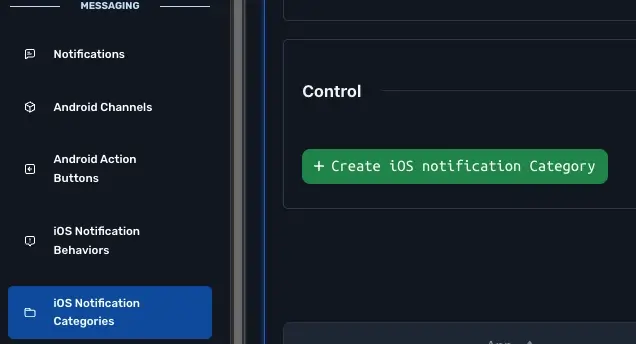
- In Navigation Messaging section pick iOS Notification Categories
- Click Create iOS notification Category
- Enter all iOS notification behavior information
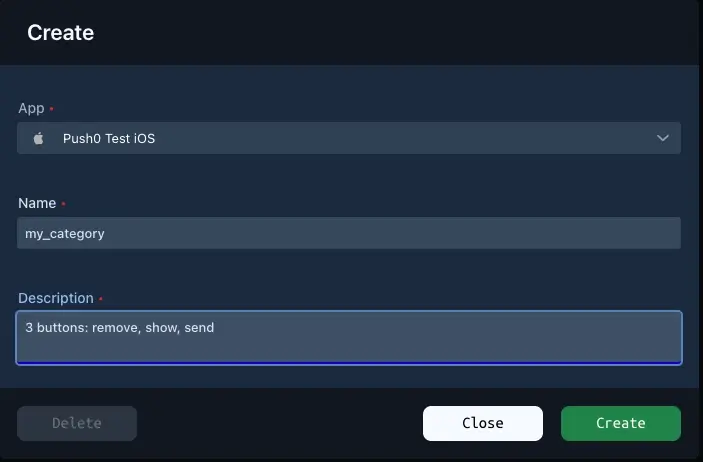
1 - Application (required)
Pick which app can use this notification category.
2 - Name (required)
Name of the category
3 - Description (required)
Description of the category.
4 - Create
Done
2. Declare categories in your app code (example)
In AppDelegate.swift
import UIKit
import Push0

@main
class AppDelegate: UIResponder, UIApplicationDelegate {

    func application(_ application: UIApplication, didFinishLaunchingWithOptions launchOptions: [UIApplication.LaunchOptionsKey: Any]?) -> Bool {

        let markAsReadAction = UNNotificationAction(
            identifier: "MARK_AS_READ",
            title: "Mark as Read",
            options: [.foreground]
        )

        let deleteAction = UNNotificationAction(
            identifier: "DELETE",
            title: "Delete",
            options: [.destructive]
        )

        let category = UNNotificationCategory(
            identifier: "MESSAGE_CATEGORY",
            actions: [markAsReadAction, deleteAction],
            intentIdentifiers: [],
            options: [.customDismissAction]
        )

        UNUserNotificationCenter.current().setNotificationCategories([messageCategory]) // apply categories

        // always before Push0.intialize

        Push0.initialize(
            applicationId: "your_app_id",
            apiKey: "your_api_key",
            customUserId: nil,
            userEmail: nil,
            logLevel: .debug,
            developerMode: true,
            launchOptions: launchOptions)


        return true
    }

}